Choose Webflow for structured, content-heavy interactive websites. Choose Framer when speed, polished motion, and prototype-like marketing pages matter more than deep CMS control. Both tools can create serious interactive web experiences, but they solve different problems and punish the wrong use case in different ways.
TLDR: Webflow is the stronger choice for a 20-page business site with a blog, case studies, SEO needs, and reusable content. Framer is better for a startup landing page where scroll effects, hover states, and fast iteration matter most. For example, a SaaS team building a 5-section product page could launch in Framer in 2 days, while a Webflow build may take 20–30% longer but give better control over CMS templates and long-term content updates. If your site will grow from 6 pages to 60, Webflow is usually the safer bet.
What “interactive” really means here
An interactive website is not just a page with fancy motion. It may include scroll-triggered animations, sticky sections, hover effects, tabs, filters, video reveals, form logic, product demos, or smooth transitions between pages. The best interaction supports the message. The worst interaction slows the visitor down.
Webflow and Framer both let teams build without traditional full-stack development. Still, they are not equal. Webflow feels closer to a visual front-end development tool. Framer feels closer to a design tool that publishes real websites. That difference affects almost every decision.
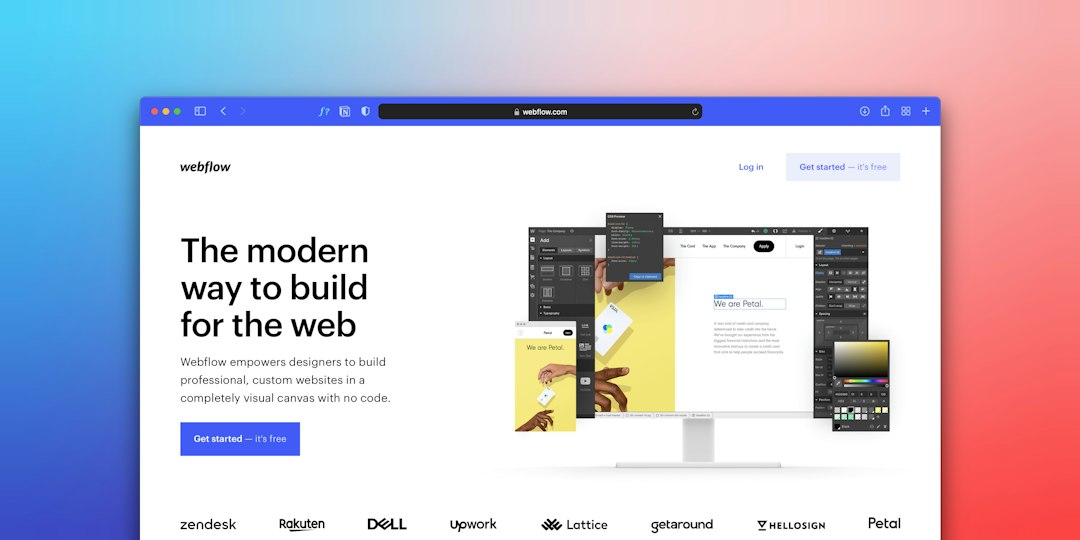
Webflow: better for scale, structure, and control
Webflow is built for people who care about layout precision, class systems, CMS structure, and clean site management. It gives designers detailed control over HTML-like structure, CSS behavior, breakpoints, and reusable components. That makes it strong for agencies, B2B companies, publishers, and teams that expect their website to grow.
The Webflow CMS is one of its clearest advantages. You can create collections for blog posts, team members, locations, events, products, white papers, or customer stories. Then you can design one template and reuse it across dozens or hundreds of items. This matters when a marketing team wants to add content weekly without rebuilding layouts.
Webflow also gives more mature controls for SEO basics. Titles, meta descriptions, slugs, redirects, alt text, canonical tags, schema options through custom code, and content structure are all manageable. For standard business websites, that level of control is often enough.
The weak point is speed of creation. Webflow has a learning curve. Its class system can get messy if a team lacks discipline. Honestly, it feels like one careless designer can create 40 duplicate classes before lunch. Fixing that later is not fun. Interactions can also become hard to manage when many animations are layered across sections.
Framer: better for speed, motion, and visual polish
Framer is excellent when you need a sleek interactive site quickly. Its design experience feels familiar to people coming from tools like Figma. You can create sections, add effects, publish fast, and adjust visual details without touching a more technical structure.
Framer shines on landing pages, product launches, portfolio sites, startup pages, and campaign microsites. Its animation features feel natural. Page transitions, scroll effects, hover states, carousels, and reveal effects can be built with less friction than in Webflow. If the goal is a polished page that feels modern and responsive, Framer is hard to ignore.
The catch is that Framer’s simplicity can become a ceiling. Larger content systems, complex editorial workflows, and strict reusable structure are not as strong as Webflow’s. Framer has CMS features, but teams with heavy publishing needs may outgrow them faster.
Expect to waste time on small production questions if your site needs complex forms, unusual filtering, or deep third-party setup. Framer can handle many common cases, but Webflow gives more room when the project moves beyond a sleek marketing surface.

Interaction design: which tool gives better results?
For interaction-heavy sites, the answer depends on the type of interaction.
- Scroll storytelling: Framer is faster for smooth visual sequences and product reveals.
- CMS-driven interactions: Webflow is stronger when the same interaction must work across many articles, products, or case studies.
- Hover and micro interactions: Both are good, but Framer usually feels quicker.
- Complex menus and structured layouts: Webflow offers more control and fewer surprises at scale.
- Custom code expansion: Webflow is often more practical for teams that need extra scripts and integrations.
There is also a performance question. Heavy motion can damage load speed and usability in both tools. A beautiful scroll effect is not useful if it causes a 4-second delay on a mid-range phone. Always test on real devices, not just a large design monitor.
CMS and content management
This is where Webflow usually wins. Its CMS is more mature and easier to trust for growing sites. A company with 80 blog posts, 25 case studies, and regional landing pages will likely feel more comfortable in Webflow.
Framer can work well for lighter content needs. For example, a startup with 8 pages, 12 blog posts, and one product changelog may be fine. But if editors need advanced content types, strict permissions, and repeatable templates across many sections, Webflow is more reliable.
Client handoff and team workflow
Webflow is better when a site must be handed to a marketing team for regular updates. Editors can change content without touching the full design surface. Designers and developers can also create rules that keep pages consistent.
Framer is better when the design team owns the site and wants to move fast. It suits teams that value speed over rigid structure. A founder, designer, or growth marketer can make changes quickly. That is useful during early product testing.
Still, speed has a cost. Framer projects can become inconsistent if every page is manually adjusted. Webflow can suffer from the same issue, but its class and CMS systems give more ways to enforce order.
SEO, accessibility, and performance
Webflow gives stronger control over technical SEO and semantic structure. That does not mean every Webflow site is good for SEO. Poor heading order, oversized images, and bloated animation still hurt results. But Webflow gives experienced builders more tools to fix problems.
Framer has improved a lot. It supports key SEO settings and can produce fast, attractive pages. For many landing pages, it is perfectly adequate. The concern appears when teams need strict accessibility reviews, complex content hierarchy, or detailed technical changes.
For accessibility, both tools require human judgment. Check color contrast. Add meaningful alt text. Use clear focus states. Avoid motion that cannot be paused. Interactive websites should not exclude users who rely on keyboards or screen readers.

Pricing and maintenance
Pricing changes often, so compare current plans before choosing. Look beyond the monthly fee. The real cost includes build time, team training, maintenance, and future redesign work.
Webflow may cost more in setup because it rewards careful structure. Framer may cost less at the start because pages can be produced quickly. Over 12 months, the cheaper option depends on who updates the site and how often it changes.
A simple rule helps: if one designer will update a small site twice a month, Framer may be more efficient. If five marketers will publish content every week, Webflow is usually the better operational choice.
Which one should you choose?
Choose Webflow if your website needs:
- A strong CMS with reusable templates
- More technical control over layout and SEO
- Regular publishing by a marketing team
- Structured case studies, blogs, directories, or resource hubs
- Long-term growth without rebuilding the whole site
Choose Framer if your website needs:
- Fast launch cycles
- High-end motion with less setup
- A startup landing page or product launch page
- Design-led editing by a small team
- Visual experimentation before the message is final
The practical answer is simple. Webflow is the safer platform for serious content systems. Framer is the faster platform for polished interactive marketing pages. If your project sits in the middle, start with the maintenance question: who will update the site, how often, and how much structure will they need six months from now?
Interactive websites are easy to overbuild. The best tool is the one that keeps the experience clear, fast, and maintainable. Motion should support trust. Structure should support growth. Pick the platform that protects those goals instead of the one that only looks impressive in a demo.