
Google rankings are like footprints in wet cement. They show where your pages stood, when they moved, and how the search results changed around them. SERP history helps you look back instead of guessing what happened.
TLDR: SERP history shows how Google rankings changed over time. It helps you see wins, drops, competitors, and algorithm effects. You can track it with rank tracking tools, Google Search Console, and regular reports. The goal is simple: learn from the past so you can rank better in the future.
What Is SERP History?
SERP means Search Engine Results Page. It is the page Google shows after someone types a search query.
SERP history is a record of those results over time. It shows which pages ranked, where they ranked, and what else appeared on the page.
Think of it like a photo album for Google results. One photo shows Monday. Another shows next month. After a while, you can spot the story.
You may see that your blog post climbed from position 18 to position 5. Nice. You may also see that a competitor jumped above you. Less nice. But still useful.

Why Historical Google Rankings Matter
Rankings move all the time. Some moves are tiny. Some are wild. SERP history helps you understand the difference.
Without history, you only see today. That is like checking the weather once and deciding the whole year is sunny.
With SERP history, you can answer questions like:
- When did my ranking drop?
- Which update caused the change?
- Did a competitor improve their page?
- Did Google add new SERP features?
- Is my SEO work actually helping?
This matters because SEO is not magic. It is testing, learning, and adjusting. Historical rankings give you clues.
What You Can Track in SERP History
SERP history is more than a list of blue links. Google results can include many different things.
You can track:
- Organic rankings: Your normal unpaid positions.
- Featured snippets: The answer box at the top.
- People Also Ask: Question boxes users can open.
- Local packs: Map results for local searches.
- Images and videos: Visual results that may steal clicks.
- Ads: Paid results that push organic listings down.
- Competitor pages: Who is winning and how often.
This gives you a much clearer picture. Your page may still rank number 3. But if ads, maps, and videos appear above it, users may barely see it.
How to Track Historical Rankings
There are several ways to track historical Google rankings. Some are simple. Some are more advanced. Most SEO teams use a mix.
1. Use a Rank Tracking Tool
A rank tracking tool checks your keywords on a schedule. It may check daily, weekly, or monthly.
You add keywords. You add your website. The tool watches your positions over time.
Many tools also save snapshots of the SERP. This is very helpful. You can see what the page looked like on a certain date.
Look for features like:
- Daily or weekly ranking data
- Competitor tracking
- Location based tracking
- Mobile and desktop results
- SERP feature tracking
- Exportable reports
This is the easiest way to build a SERP history database.
2. Use Google Search Console
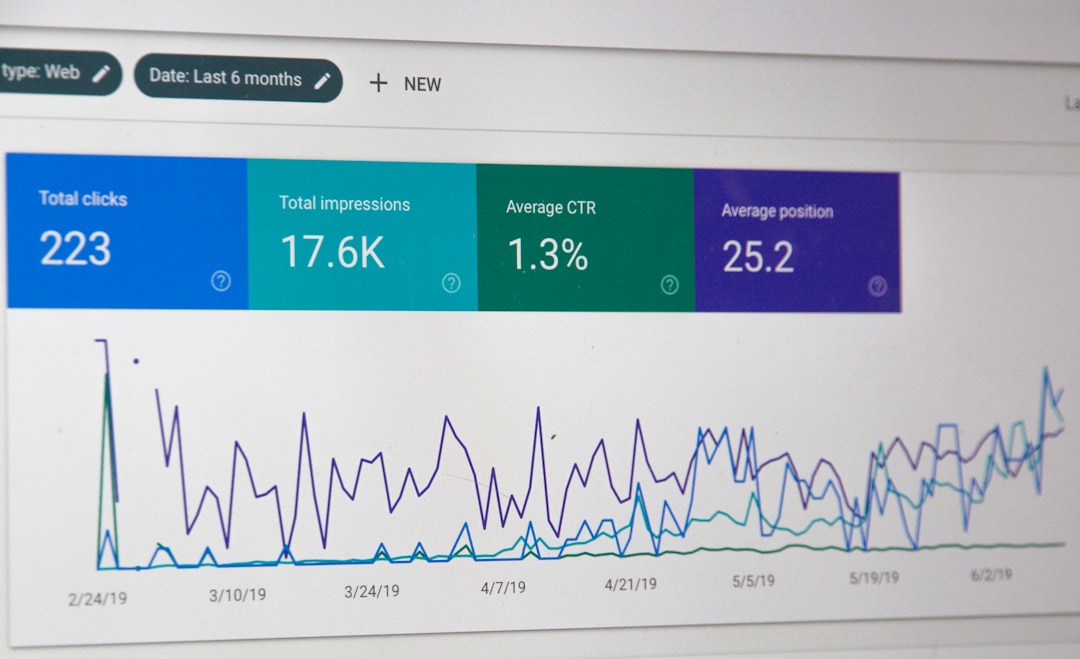
Google Search Console is free. It shows how your site performs in Google Search.
It does not show perfect daily rankings. But it gives useful data. You can see:
- Clicks
- Impressions
- Average position
- Queries
- Pages
- Countries
- Devices
The key metric here is average position. It tells you the average ranking for a page or keyword.
Be careful, though. Average position can be messy. If your page ranks number 2 in one city and number 20 in another, the average may hide the truth.
Still, Search Console is great for spotting trends. If impressions drop fast, something changed. If clicks rise slowly, your SEO work may be paying off.
3. Save SERP Screenshots
This sounds basic. But it works.
If a keyword is very important, save screenshots of the Google results. Do this before and after big SEO changes.
For example, take screenshots when you:
- Update an important page
- Publish new content
- Change title tags
- Improve internal links
- Notice a ranking drop
Screenshots show the full picture. They capture ads, snippets, maps, images, and competitors.
It is like keeping receipts. But for SEO.
4. Track Competitor Rankings
Your rankings do not move alone. Competitors move too.
If you drop from position 4 to position 6, you should ask why. Did your page get worse? Maybe. Did two competitors improve? Also maybe.
Track the top pages for your main keywords. Watch their title tags. Watch their content length. Watch their backlinks. Watch how fresh their pages are.
Sometimes a competitor wins because they answered the query better. That is useful. You can improve your page and fight back.
How Often Should You Check SERP History?
Do not stare at rankings every five minutes. That way lies panic. And too much coffee.
For most websites, weekly tracking is enough. For very competitive keywords, daily tracking can help.
Use this simple guide:
- Daily: Important money keywords or fast moving niches.
- Weekly: Normal SEO campaigns and content sites.
- Monthly: Long term trends and executive reports.
The goal is not to react to every tiny wiggle. The goal is to spot patterns.
What Causes Ranking Changes?
Google rankings shift for many reasons. Some are under your control. Some are not.
Common causes include:
- Google algorithm updates: Big changes in how Google ranks pages.
- Content changes: Your page, or a competitor page, got updated.
- Technical SEO issues: Slow pages, broken links, or indexing problems.
- Backlink changes: New links or lost links can affect trust.
- Search intent changes: Google decides users want a different type of result.
- SERP feature changes: A new snippet or video block appears.
SERP history helps you connect the date of a change with the likely cause.

How to Use SERP History to Improve SEO
Tracking is nice. But action is better.
Here is a simple process:
- Pick your key pages. Start with pages that bring leads, sales, or traffic.
- Choose target keywords. Do not track every phrase on Earth.
- Record rankings over time. Use tools, Search Console, or both.
- Mark important dates. Note content updates, site changes, and Google updates.
- Compare competitors. See who moved and why.
- Improve the page. Add better answers, cleaner structure, and stronger internal links.
- Watch the next trend. Give Google time to react.
This turns SEO from guesswork into a game plan.
Common Mistakes to Avoid
SERP history is powerful. But it can trick you if you use it badly.
- Do not obsess over one day. Rankings bounce.
- Do not track only desktop. Mobile results can be different.
- Do not ignore location. Rankings vary by city and country.
- Do not forget SERP features. Position 1 is not always the top visible result.
- Do not panic after updates. Wait, measure, then act.
SEO is a long game. SERP history is your scoreboard.
Final Thoughts
Historical Google rankings show where you have been. They also show where you may be going.
When you track SERP history, you stop guessing. You see patterns. You spot competitors. You notice Google changes. You make smarter SEO choices.
Keep it simple. Track the right keywords. Review the data often. Take notes. Then improve your pages one step at a time.
Google may be mysterious. But with SERP history, it becomes a little less spooky. And a lot more useful.